Simulator
The template includes a simulator that lets you test your application on your computer without flashing it to the calculator.
Why Use the Simulator
This is especially valuable because the calculator's flash memory degrades with each write cycle, the less you write to it, the better.
IMPORTANT
This is a simulator, not an emulator, it does not replicate the calculator's hardware. If your code directly accesses hardware, the simulator cannot handle it, and you will need to test on a physical device. In that case, consider providing a dummy/stub implementation of those features for use in the simulator.
Running the Simulator
Open a terminal (not an IDE-embedded terminal, a standalone one), navigate to your project folder (inside WSL if you're on Windows), and run:
./docker.sh sim {threads}Replace {threads} with the number of threads to allocate for compilation, more threads means faster builds.
NOTE
This is the official Numworks simulator, downloaded from their GitHub repository and compiled locally. We cannot distribute a pre-compiled binary for licensing reasons.
The first build may take a while, this is expected.
Once running, a window representing a Numworks calculator will appear. You can interact with it just like a physical device.
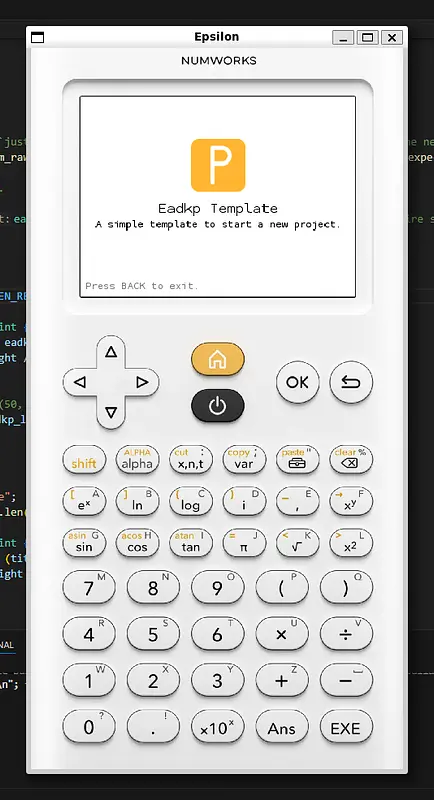
This illustration is deprecated; the template’s default UI no longer looks like this.
Troubleshooting
Black screen or freeze on startup: Your code likely has no way to exit its main loop. If nothing (e.g. a keypress) can break out of the loop, the simulator will not run it.
Instant crash: Most likely caused by an instruction the simulator doesn't support, typically a hardware access attempt or use of an unsimulated feature.
Window closes immediately: Your code probably has no main loop at all, so the program runs to completion and exits right away.